
We know that feeling of being helpless when your iPhone shuts you out. Whether you forget your iPhone lock screen password, forget the screen time limit, or inherit a locked device, we have practical solutions.
Possible scenarios where your iPhone is locked
Continuously updated iPhones offer increasingly advanced security protection, but this can also lead to sometimes you’re unable to unlock your device:
Password issues
- After multiple wrong attempts, especially after entering the wrong passcode 10 times, you will get the message that your iPhone is permanently disabled
- You may have forgotten that you changed your password last week and it wasn’t backed up in Notepad
Biometric failure
- Facial recognition suddenly doesn’t recognize you (probably after you cut your hair or wear new glasses)
- There is a possibility that Touch ID will fail to recognize when your fingers are wet or dirty
Second-hand devices
- Bought a second-hand iPhone, only to find that it is still associated with someone else’s Apple ID
- The locked Activation Lock screen is preventing you from using your iPhone or iPad
Once you are unable to unlock your iPhone because of any of the above scenarios, it will result in you not being able to access the data in your device. Don’t worry, the easiest solution is to use a professional iPhone unlock software to remove the device lock safely, which we will cover in detail for you in the following content.
The Smart Solution: FoneTool Unlocker
After helping thousands of users regain access to their iPhones, we keep recommending FoneTool Unlocker because it can:
✅ Clear all types of iPhone locks like Face ID and Touch ID in minutes
✅ The tool saves your data as much as possible, while Apple’s official method directly erases all your data
✅ Available on all iPhone, iPad, iPod Touch models, and iOS versions
✅ No technical skills are required, just follow the simple instructions to unlock it successfully
Here are the more prominent advantages of FoneTool Unlocker compared to other unlocking tools:
☛ More advanced data security technology: Unlike iTunes recovery (which erases everything), FoneTool usually preserves the integrity of your photos, information, and apps
☛ All-in-one iOS unlock solution: Not only can you easily unlock iPhone screen, Screen Time passcode, but you can also remove Apple ID without password, and more
☛ Constant updates: Always be ready with the latest iOS version
Let’s learn how to unlock iPhone without passcode with this free iPhone unlock software.
Step 1: Download and Install
- Get FoneTool Unlocker from the official website
- Download and install it on your Windows PC, it may take up to 1 minute
Step 2: Connect your iPhone to Computer
- Connect your iPhone to the computer with an Apple-certified cable
- Turn off Find My iPhone on your iPhone to keep data before starting the official unlocking steps
- Open FoneTool Unlocker, select the mode you want to unlock, here you can choose “Remove iOS Screen Passcode”

Step 3: Put your iPhone into recovery mode
- Follow the prompts given on the screen to put your iPhone of the corresponding model into recovery mode
- For most models: Press the volume up, then the volume down, then press and hold the side button

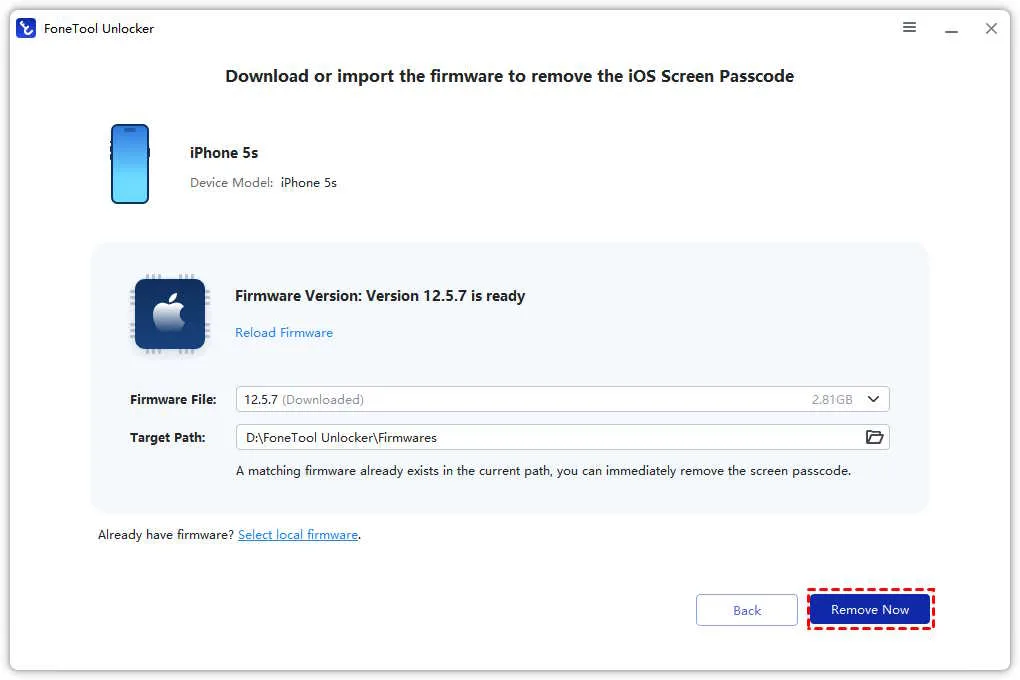
Step 4: Download the firmware
- FoneTool Unlocker will automatically recognize your iPhone model and provide the corresponding firmware
- Download the required firmware
Step 5: Congratulations on unlocking your iPhone successfully
- Tap the Remove Now button to start unlocking your disabled iPhone
- Your iPhone will restart after unlocking it successfully, and you can reset a passcode that you can remember
Wrapping things up
Whether you forgot your iPhone passcode or accidentally touched your iPhone and your iPhone is disabled, and you can’t unlock your iPhone, it doesn’t mean that you will lose your data and device access. With the right tools and our simple guide, you can easily unlock your iOS device without a passcode and regain access to your iPhone. FoneTool Unlocker has outstanding effectiveness and ease of use, making it our top recommendation.
It is worth mentioning that the best way to avoid iPhone being locked is prevention. You guys recommend that you save the newly set passcode in a safe place after you have successfully unlocked your iPhone to prevent you from being locked out of the door again by the device.