
Introduction
Downloading a YouTube playlist to MP3 has indeed become popular among users who want offline access to their favorite content. Converting a YouTube playlist to MP3 gives users flexibility, convenience, and data savings. For instance, students might download entire playlists of TED Talks, lectures, or tutorials to listen to repeatedly, all without an internet connection, thus making the whole studying process much easier.
On the other hand, music lovers want to download YouTube playlists to MP3 because it is more about saving live performances, covers, or unique versions of their favorite songs that are not present on the music streaming platform. MP3, of course, goes with most devices, uses less storage, and can be played anywhere, anytime. But how can you convert YouTube MP4s to MP3s?
Below, we walk you through using the powerful YouTube playlist downloader to MP3, FliFlik UltConv, which allows a high-quality conversion process with an easy-to-use feature set to deliver for all your offline audio needs. Read on till the end to understand how to go about it.
Part 1. Why Use FliFlik UltConv?
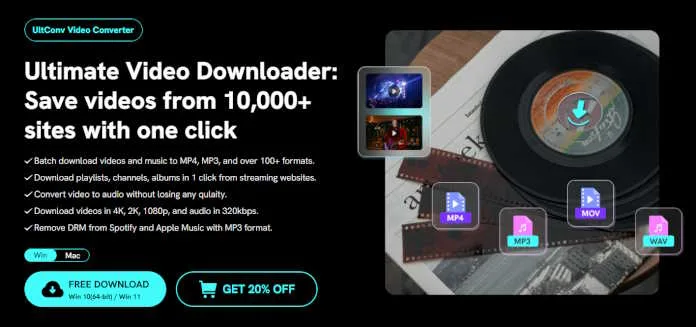
In recent years, has proved to be the leader in the fast and efficient conversion of YouTube playlists to MP3s. Here are four main reasons why FliFlik UltConv Video Downloader is chosen by most users:
- Batch Conversion
One of the main reasons is that it supports batch downloading and conversion of YouTube videos. Users can convert numerous videos individually or in whole playlists simultaneously. It’s beneficial when you want to download large chunks of content at once, thus saving your time and energy from repetitive manual work.
- High-Quality MP3 Output
Secondly, UltConv provides high-quality audio because it converts videos into MP3 at up to 320kbps, meaning you get studio-quality clarity from lectures, podcasts, or your preferred music tracks.
- Basic Editing Features
Users can edit their audio before downloading it by trimming its length, changing the volume, and modifying the bitrate. Such editing capabilities allow you to have more say on the final output without installing any other applications.
- Wide Streaming Sites Compatibility
Finally, it is not just a YouTube converter. It supports downloads from over 10,000 websites, including Facebook, Instagram, Dailymotion, and Vimeo-lending a helping hand to all sorts of audio content conversion and management needs.
Part 2. How to Download a YouTube Playlist to MP3 Audio
Step 1: Download and Install UltConv
First off, go to the official FliFlik website and download the UltConv Video Converter. It is available for Windows as well as macOS. Follow the on-screen instructions to get the program set up.
Step 2: Set Output Format to MP3 (320 kbps)
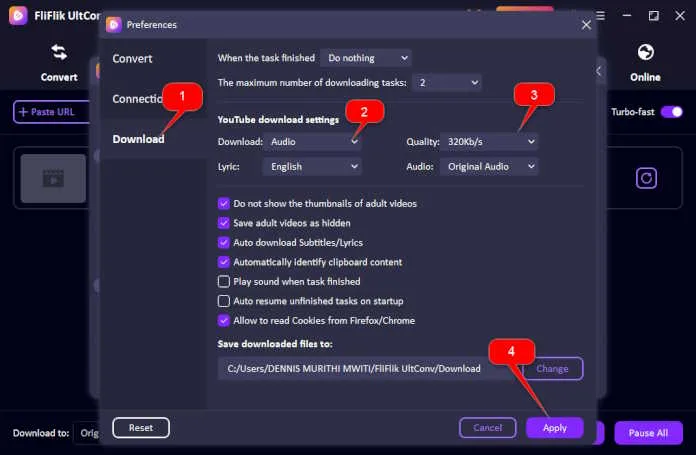
Open UltConv and set up the preferences (on the settings menu) by outputting the audio format to MP3 with 320 kbps quality to ensure that the audio downloaded is of the best quality and thus creating an enjoyable offline listening experience for your cherished kind of music or spoken track.
 Step 3: Find the YouTube Playlist You Want to Download
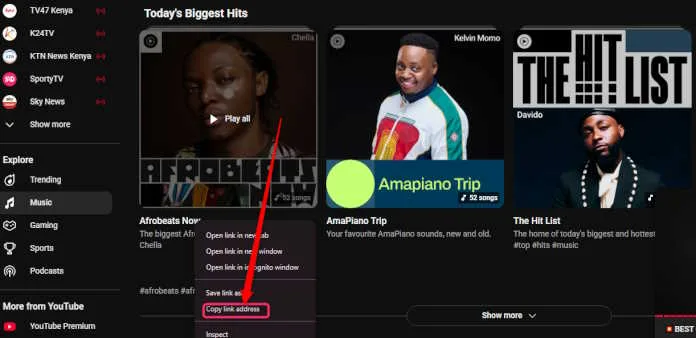
Go to YouTube and copy the URL of the playlist you want to download; then paste the URL into UltConv’s input field. The software will analyze the playlist and present all the videos included within.
 Step 5: Select the Videos from the Playlist
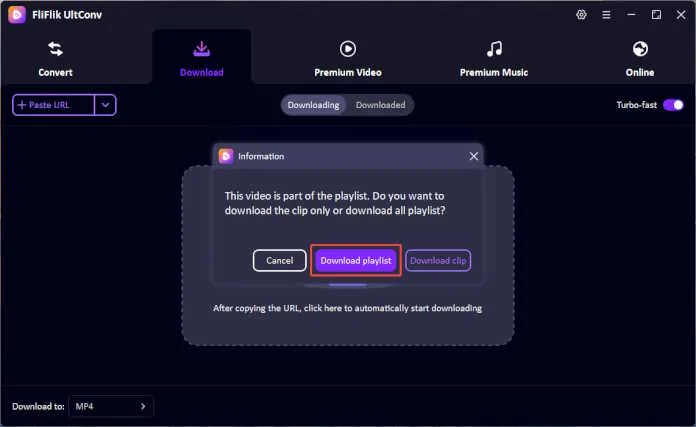
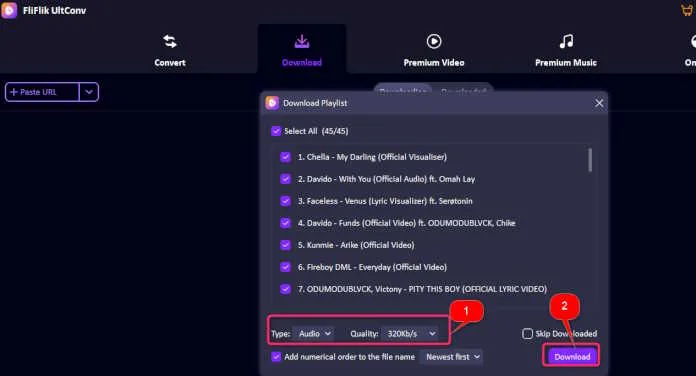
Click on Download Playlist. UltConv will display the list of videos included in that playlist. You can either opt to download all videos or select specific videos you wish to convert to MP3. This way, you are given full liberty in your downloads.
Step 6: Start the Download and Conversion Process
After selecting the videos, hit the Download button. UltConv Video Converter will begin downloading the videos and automatically convert them into MP3 files in your chosen quality setting. Once completed, the files will be saved to your designated folder on your computer.
 Part 3. Why Should I Download a YouTube Playlist to MP3?
There have been some practical reasons why YouTube playlists should be converted and downloaded in MP3 format. Here are the best two reasons:
- Education Purposes
Many students and dependent learners look for educational content on YouTube-TED Talks, online courses, language lessons, and lectures. It works great when the playlist is converted to MP3 so that one can listen intermittently offline as on the way, while studying, or while revising; this saves mobile data and can be played over and over again, which reinforces the retention of the one-half concepts in great measure.
- Entertainment
Music lovers rely on YouTube for live performances, remixes, or unreleased tracks that are not available through online streamers. Downloading a YouTube playlist to MP3 will make those unique audio experiences usable while offline.
Part 4. Advice While Using FliFlik UltConv
FliFlik UltConv is an extremely powerful and convenient software to download YouTube playlists to MP3 format, but caution should be exercised to do it legally. The software is generally considered for personal use, e.g., to save content for offline learning or private enjoyment. Always ensure that you are not infringing upon copyright laws or the terms of service accepted by the site concerned before downloading any playlist or video.
Some material on YouTube is protected by copyright, and unauthorized downloading might be against local laws. Verify if the material you are converting into MP3s has entered the public domain, or is under Creative Commons licensing, or else that you have the explicit permission of the copyright holder.
Final Words
Converting and downloading a YouTube playlist to MP3 via FliFlik UltConv is an efficient and smart way to enjoy your offline content. Whether you are a student who wants to review materials without eating data or a music lover who wants to keep live performances of rare tracks, UltConv is the answer.
Thanks to batch conversion, 320kbps high quality, and some slight editing capabilities, it is indeed a trusty application in the user’s hands. Just bear in mind that you should be responsible in its usage, and always follow copyright regulations in your area. So, what are you waiting for? Come download FliFlik UltConv and start filling up your offline MP3 library with the best quality easily.