




Designing forms that drive user engagement and generate leads is no longer a task reserved for developers or designers. This article explores how AI powered form builders simplify the entire process, allowing anyone to create conversion ready forms instantly. You’ll learn what an AI form builder is, why it matters for lead capture, and how it can help you optimize results with minimal effort.
Why Form Design Matters for Conversions
A well designed form is often the difference between a visitor who completes an action and one who abandons it midway. Whether it’s a lead generation form, a survey, a payment form, or a quiz, the design directly impacts how users interact with it, and ultimately, whether they submit it.
How Form Design Affects User Experience and Submission Rates
When users encounter a form, their experience is shaped by factors like visual layout, question flow, ease of input, and perceived effort. A cluttered or confusing form increases cognitive load, making users think harder than they should. This friction discourages completion, leading to lower submission rates and missed conversion opportunities.
On the other hand, a clean, intuitive form design reduces effort, guides the user smoothly from start to finish, and creates a positive interaction. This improved user experience translates to higher submission rates, better lead quality, and more valuable data collection.
Common Pain Points That Hurt Form Conversions
- Complexity and Length: Long forms with unnecessary fields overwhelm users and increase abandonment rates.
- Poor UX Flow: Disjointed layouts, unclear instructions, and lack of logical question sequencing confuse users.
- Mobile Unfriendliness: Forms not optimized for mobile devices create usability issues, especially as mobile traffic dominates.
- Slow Load Times: Heavy forms with too many scripts or poor optimization cause delays, frustrating users.
- Generic One Size Fits All Approach: Static forms that don’t adapt to user input fail to engage and feel impersonal.
The Role of Conversion Optimized Forms in Business Success
Conversion optimized forms are designed with the end user in mind. They focus on:
- Minimizing friction with simplified layouts and only essential fields.
- Guiding users through multi step flows that feel easier to complete.
- Adapting dynamically to user responses for a personalized experience.
- Encouraging trust with clear CTAs, progress indicators, and mobile friendly design.
What is an AI Form Builder?
An AI form builder uses artificial intelligence to automate the creation and optimization of online forms. Unlike traditional form builders that require manual design and setup, AI powered builders streamline the entire process, making it easier and faster to create professional, conversion ready forms.
Core Features of AI Form Builders
- Auto Generated Questions: AI can instantly suggest relevant questions based on the form’s purpose, whether it’s for lead capture, surveys, payments, or feedback.
- Design & Layout Recommendations: Smart suggestions help optimize form structure, ensuring it’s user friendly and visually appealing.
- User Flow Optimization: AI analyzes user behavior to recommend multi step flows, reducing overwhelm and guiding users through a smoother journey.
Key Benefits of Using an AI Builder for Forms
1. Instant Form Creation
One of the most significant advantages of AI form builders is their ability to create fully functional forms in seconds. As you specify the form’s intent, such as lead generation, customer feedback, or interactive quizzes, the AI automatically generates a tailored form with the right questions, layout, and flow.
2. Data Driven Optimization
AI builders don’t rely on assumptions. Instead, they use data backed insights to optimize every element of a form. From suggesting the ideal number of fields to recommending the best sequence of questions, AI ensures the form is designed for maximum completion rates.
This data driven approach helps reduce user friction, minimizes drop off rates, and enhances the overall form experience, leading to higher conversion rates.
3. Personalization at Scale
A major strength of AI powered forms is their ability to offer personalized experiences, without manual intervention. Through conditional logic, forms can dynamically adjust based on user responses, guiding them to the most relevant questions and outcomes.
This real time adaptability not only makes the forms more engaging but also ensures that users only see content that matters to them, improving both user satisfaction and data accuracy.
How to Create an Online Form Using an AI Builder (Step by Step)
With an AI powered form builder, anyone can build high converting forms in just a few simple steps. Here’s how the process works:
Step 1: Choose an AI Powered Form Builder
To start, choose a powerful form builder such as involve.me AI form builder, that suits your business needs.There are several tools available, that stand out for their ease of use, flexibility, and free AI powered form generation.
With a multi step funnel builder, you can quickly create:
- Lead generation forms
- Surveys & feedback forms
- Payment forms
- Online quizzes & calculators
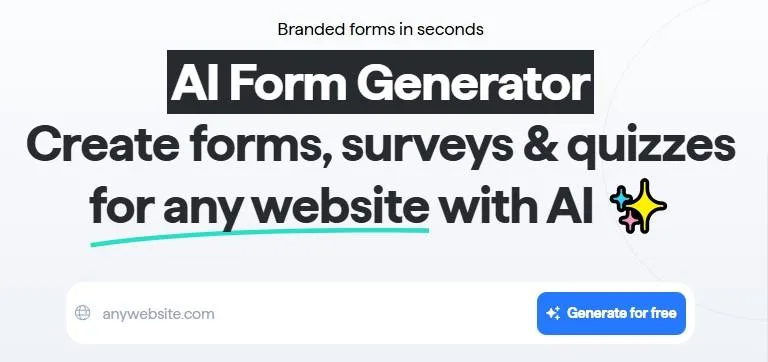
Step 2: Enter Your Website URL & Write a Prompt
To create a form that matches your brand, paste your website’s URL into the AI Form Builder. This allows the AI to automatically apply your logo, colors, and fonts for a cohesive look.
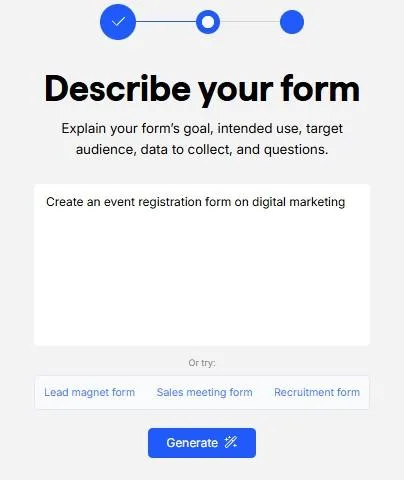
Next, write a simple prompt describing the form you want. For example:
“Create an event registration form on digital marketing.”
The more specific you are, the better the AI will tailor the form to your needs. Once ready, hit the “Generate ✨” button and let the AI do its magic.
Step 3: Review & Customize the Generated Form
Within seconds, the AI Form Generator will present you with multiple form designs, already branded with your website’s visual elements. You’ll have options to choose:
- One question per page layouts for higher engagement.
- Multiple questions on a single page for faster completion.
If you want to make further adjustments, you can easily customize the form using a drag and drop editor.
Additional Elements You Can Add:
- Contact Fields: Collect essential information like name, email, and phone number.
- Answer Piping: Personalize the form experience by dynamically using previous answers.
- E-signatures: Add signature fields for contracts, applications, or event registrations.
- Email Confirmations: Automatically send custom emails to users after form submission.
- Advanced Features: Add file uploads, payment options, and conditional logic to create multi functional forms.
Step 4: Integrate with Your Existing Tools
To streamline your workflows, connect your form with the tools you already use. The most powerful AI powered form builders offer seamless integrations with:
- CRM systems
- Email marketing platforms
- Payment gateways
- Productivity tools
This ensures your form data flows directly into your business systems, saving time and improving data management.
Step 5: Share, Embed & Promote Your Form
Once your form is ready, it’s time to share it with your audience. You can:
- Share a direct link to the form.
- Embed the form on your website by copying the provided embed code.
- Distribute it via social media, email newsletters, or landing pages.
To embed the form:
- Go to the “Share & Embed” section.
- Choose your preferred embed type (inline, pop up, etc.).
- Copy the embed code.
- Paste it into your website’s CMS or HTML editor.
This ensures your form is easily accessible, driving more submissions and conversions.

Why This Process Works
- Reduce form abandonment with user friendly designs.
- Enhance data accuracy through smart question flows.
- Improve conversion rates with branded, optimized forms.
- Save time through AI automation and integrations.
Final Words
Form design plays an important role in converting website visitors into leads, customers, or engaged users. However, traditional form creation can be time consuming and prone to inefficiencies. This is where AI powered form builders offer a smarter solution.
This tool automates the design process, suggesting data driven improvements, and enabling real time personalization. AI builders help businesses create professional, conversion ready forms with minimal effort. From lead generation to customer feedback and payment forms, the benefits of AI driven form optimization are clear: higher engagement, better data quality, and improved conversion rates.