



Some of the best things in life come as a surprise to us. Screen sharing apps were no different. It took the onset of a pandemic to ignite the acceptance and growth of this virtual development.
Recently, Global Screen Sharing Software Market reported significant business optimization strategies to improve conversion rates. A recent analysis provided excellent future possibilities and trends in this domain.
Before we leap into discussing the best options out there, let’s shed light on what screen sharing actually is:
What is Screen Sharing?
Screen Sharing, as the word pretty much tells us, is about instant collaboration. Users can share a live video feed of what happens on their computer screens with everyone on the conference call.
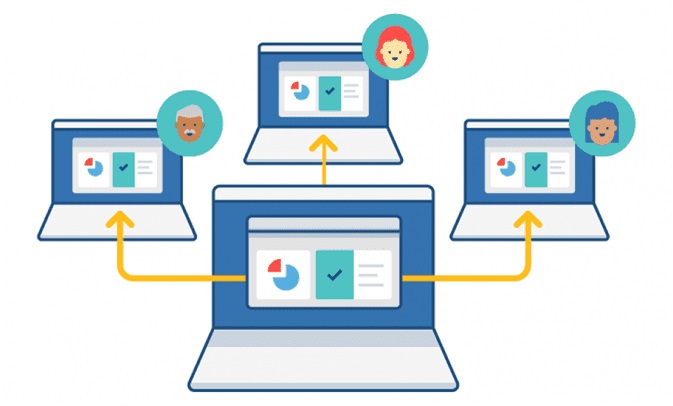
Also known as desktop sharing, this can include sharing all elements on the screen or just one window. You get thorough control over the visibility of your desktop, and it guarantees complete privacy. The users can interact simultaneously, navigate the interface, and make changes.
Best Screen Sharing Apps to Opt For
Any software that lets you meet remotely with colleagues and clients can significantly help your business. We suggest you get your pens out and jot them down, or better, install one right after you are done with this post!
1- Zoom
Zoom ranks as the best video calling application available in the market. It is simple and provides a great user experience. All you need to do is sign in, create a call, and invite others to this call. The invitees don’t need a Zoom ID.
As soon as you have started the call, you can share your entire desktop or a specific app for the people. It automatically creates a separate window to display all participants in the ring. It can easily integrate with calendar applications. This makes it easy to fix meetings with your clients and invite others to this screen-sharing session.
Its free plan allows you to host a meeting with 100 viewers for 40 minutes. In this, you can share the screens, record the call, and have a video conversation.
2- TeamViewer
TeamViewer is a robust tool for file sharing and remote desktop access. It is an easy-to-use solution that offers a whole list of features and security protocols. You can make sure that these remote interactions are effective and safe.
It deploys AES-256-bit encryption and two-factor authentication simultaneously. This security algorithm, like that of airG scam free apps, is powerful and mature.
It has necessary features like whiteboard, drag and drop file sharing, and session recordings. All of this is to ensure that the entire team stays on the same page.
So far, TeamViewer is activated on 2 billion devices, where 45 million stays online simultaneously.
3- Join.me
Join.me is another strong player in the screen sharing field. It allows the user to create a room and invite others to view their screen. It stands out in the image quality and the brilliant interface.
It can be used by various devices and includes features like interactive whiteboards, personal links, and one-click scheduling. Participants can also take turns to present their screens. Each user in the presenter role can switch to another participant in the meeting to share their screens.
It allows screen sharing with up to 50 people.
4- Skype
Skype is one of the most reliable screen-sharing apps you can find in the market. As they say, old players are the hardest ones to beat. It doesn’t have a wide span of features, but it is the most popular app with a simple interface.
This app offers a benefit to Office 365 users. Skype minutes are free in the bundle, so you don’t need to make extra payments to avail of the Skype premium features. It allows you to share screens and give presentations. However, there is a limit of members on call in the free version. So unless you already have an Office 365 subscription, this app doesn’t offer many incentives.
5- GoToMeeting
GoToMeeting ranks top in the best conference calling services. It gives you all the tools you need to run a successful business. It stands out due to its excellent customer service, powerful features, and incredible call quality.
This app falls in the same category as Skype. It allows screen sharing, enables audio conversation, but you could look for better options. Even the pricing plans tell us that this isn’t the best value piece in the screen-sharing domain.
6- Slack
This one is perhaps the most diverse corporate apps prevailing in the market right now. Besides its great use as a project management app, Slack also allows screen sharing. You can enable others to view your screen and use their cursor to get things done on your screen. If you are always buried in the screens, consider having a multiple monitor setup and installing Slack to boost your productivity.
The app also features the allowance to switch hosts, record calls, and access a well-organized archives section. All of these features render this app the one that could beat all on the list. However, we suggest you check out its premium and free versions to learn more about its reliability.
Final Thoughts
The digital landscape continues to shock humanity with every passing day. Your grandpa never even thought about someone managing his personal documents while they sat miles apart. This is proof that we would be witnessing immense developments in the virtual landscape in the years to come.
We must strive to stay on the learning curve and adapt to retain our positions in the financial world. And using screen-sharing apps is one step in this journey.