In today’s fast-changing world, technology is reshaping many aspects of our lives, and the art world is no exception. One of the most exciting advancements is the development of AI image generators. These tools are revolutionizing the way artists create visual art, making it easier, faster, and more exciting. But how exactly are these AI tools helping artists? Let’s take a closer look at how AI image generators are opening up new possibilities and unlocking creativity for artists everywhere.
What is an AI Image Generator?
An AI image generator is an advanced tool that uses artificial intelligence to create images based on text descriptions or sample images. Simply put, you describe the image you want, and the AI creates it for you. These tools are powered by deep learning and neural networks, which allow them to analyze patterns and generate highly realistic or abstract images.
With an AI image generator, artists can now create stunning visuals quickly and efficiently. Instead of starting from scratch, artists can use these tools to generate a base image or to experiment with new ideas. For example, an artist might describe a scene, and the AI will generate different variations, giving them a range of possibilities to choose from. This allows the artist to focus more on refining their ideas, rather than spending time on the initial creation process.
The Role of AI in Enhancing Artistic Creativity
Artificial intelligence is not here to replace human creativity. In fact, it’s designed to enhance it. For many artists, AI is a powerful tool that allows them to explore new ideas and expand their creative horizons. Instead of being limited by their own skills or tools, artists can use AI to create images that might be difficult to produce otherwise.
An AI avatar, for example, is a great way for artists to bring characters to life. You can describe a character’s appearance in detail, and the AI will create an avatar that fits that description. This can be especially helpful for illustrators and game designers who need to quickly create characters for their projects. Rather than drawing each character by hand, they can generate avatars with specific features, styles, and details, saving time while still maintaining a high level of customization.
AI also helps artists by providing inspiration when they feel stuck. Sometimes, it’s hard to come up with new ideas. With AI, artists can experiment by entering different prompts and seeing how the tool interprets them. This gives them fresh perspectives and new concepts that they may not have thought of on their own.
AI Image Generators: A Gateway to New Forms of Expression
AI image generators have opened the door to a whole new world of artistic expression. The possibilities are endless. Artists can create images that blend different styles, mediums, and influences, something that may not have been possible using traditional methods. Whether you want to create a futuristic cityscape, a magical fantasy world, or a mix of both, AI can help bring your vision to life.
For example, you can experiment with surreal landscapes that combine the real world with fantastical elements. You could ask the AI to create an image of a sunset over a city made entirely of glass or a forest filled with glowing trees. The AI image generator allows you to explore your imagination and push the boundaries of what’s possible.
Moreover, AI offers speed and efficiency. Artists no longer need to spend hours sketching or painting the basics of an image. Instead, they can generate the core of the artwork within minutes, allowing them to focus more on the creative aspects, such as refining details or adding personal touches. This can be a huge time-saver, especially for those working on multiple projects at once.
How AI Image Generators Can Aid Artists in Their Workflows
AI tools like image generators are transforming the workflows of many artists. Instead of starting from scratch, artists can use AI to help them generate ideas, create backgrounds, or even add details to their work. This is particularly useful for graphic designers, illustrators, and concept artists who often need to produce high-quality visuals in a short amount of time.
AI image generators also help break creative blocks. If an artist is unsure about what to create, they can simply input a few keywords, and the AI will generate an image. This process can spark new ideas and give the artist a starting point to build upon. In some cases, the generated image might even become the foundation of a larger project.
Additionally, AI tools allow artists to quickly test different styles and concepts. For example, you could create a landscape in one style, then tweak the AI settings to see how the same scene might look in another style, such as cubism or impressionism. This flexibility gives artists the freedom to experiment without worrying about the time it would take to manually create each variation.
A Step-by-Step Guide: Using CapCut’s AI Image Generator for Your Creative Work
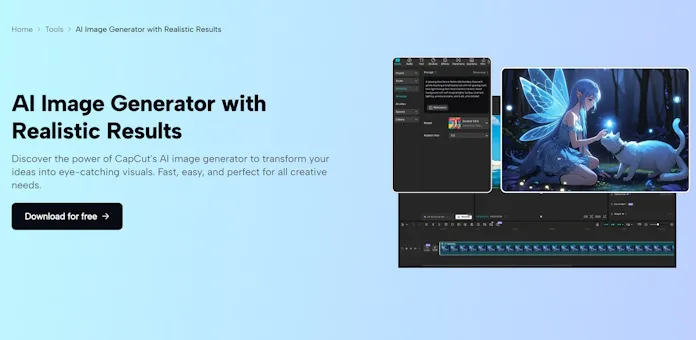
If you’re looking for a tool to get started with AI-generated images, CapCut’s AI image generator is a great option. Here’s a simple, three-step guide on how to use it on the desktop version:
Step 1: Describe Your Vision
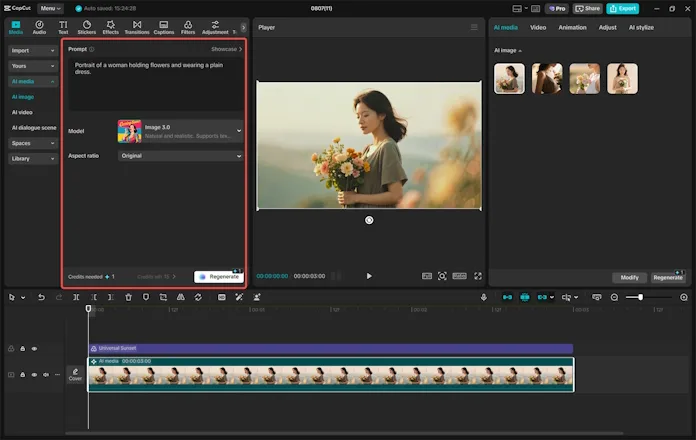
Launch CapCut and enter the editing interface. From the left panel, go to “AI media” > “AI image.” In the prompt box, type a detailed description of the image you want to generate. For example, you might write: “A futuristic cityscape at sunset, with flying cars and neon lights.” You can also upload a reference image to guide the AI in generating something similar.
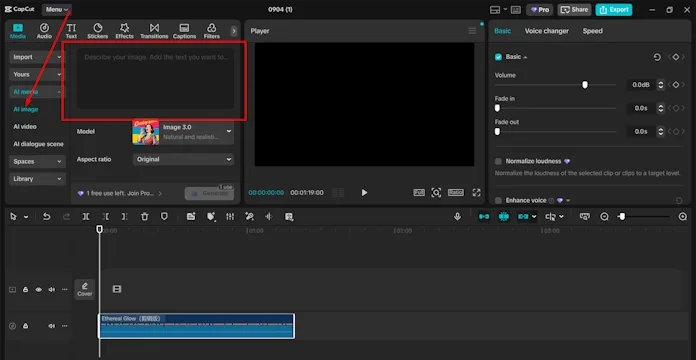
Step 2: Select a Model and Aspect Ratio
Once you’ve entered your description, it’s time to choose a model. CapCut offers several models such as Image 3.0, Image 3.1, Image 2.0 Pro, and Seedream 4,0. Each model has a different level of realism and detail, so you can pick one based on your needs. After choosing a model, select the aspect ratio that fits your platform (e.g., 9:16 for TikTok or 16:9 for YouTube). When you’re ready, click the “Generate” button.
Step 3: Download and Share
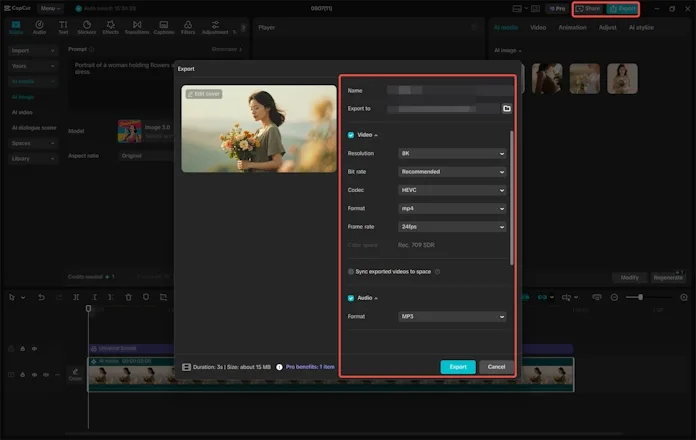
Once the AI has generated your image, you can review the result. If you’re happy with it, click the Export button on the top-right corner. Choose the format and resolution you want (up to 8K), and then click “Export” to download the image to your device. From there, you can share your creation or use it in your projects.
The Future of AI in the Arts: A New Horizon for Artists
As technology continues to evolve, the role of AI in the arts will only grow. More artists will turn to AI image generators to speed up their processes, explore new ideas, and push the limits of creativity. The collaboration between human creativity and AI’s powerful capabilities is just beginning, and the future is full of exciting possibilities.
At the same time, there will be ongoing discussions about the ethical implications of AI in the creative world. Some argue that AI could replace human artists, while others believe it’s a tool that enhances artistic expression. One thing is certain: AI is not here to replace creativity; it’s here to unlock new pathways for artistic exploration.
Conclusion
AI image generators are an exciting development in the world of art. They provide artists with powerful tools to create, experiment, and innovate in ways that weren’t possible before. Whether you’re a seasoned artist or a beginner, AI can help unlock your creativity and bring your ideas to life faster and more efficiently than ever before. By using tools like CapCut’s AI image generator, you can begin your own creative journey and explore new artistic possibilities.