For traders across Forex, crypto, and stock markets, economic calendars are not optional—they are essential. A single unexpected economic release, such as U.S. Non-Farm Payrolls (NFP), a European Central Bank interest rate decision, or a surprise inflation report, can shake markets and trigger sharp price movements in seconds. Traders who are not aware of these events often find themselves on the wrong side of volatility. That’s why professional and retail traders alike rely on economic calendars to track scheduled announcements, anticipate volatility, and adjust strategies.
In recent years, trading platforms and financial websites have gone beyond simple web-based calendars. Today, many providers offer Chrome extensions that put economic events just a click away, directly in your browser toolbar. This convenience allows traders to monitor upcoming events while analyzing charts, running trading platforms, or even browsing unrelated sites.
This article reviews and compares six of the most useful Chrome extensions and economic calendar tools, highlighting their strengths, weaknesses, and the types of traders they serve best.
Quick Picks — Top Economic Calendar Extensions and Tools
- TradingFinder — “TradingFinder Economic Calendar” (Chrome Extension)
- Investing.com — Chrome Extension + Web Calendar
- TFlab — “Economic Calendar TFlab Events (Forex, Crypto & Stock Market)” (Chrome Extension)
- Myfxbook — “Economic Calendar, Market & News” (Chrome Extension)
- FXStreet — Chrome Extension + Calendar
- Forex Factory — Website + Third-Party Extensions
- TradingFinder (TradingFinder Economic Calendar Extension)
Why traders like it:
TradingFinder positions itself as an all-markets economic calendar designed for accessibility. Unlike some tools that focus primarily on Forex, this extension highlights macroeconomic releases across nearly 40 countries, with impact labels (high/medium/low) and filtering options. The big draw here is speed—you don’t need to open another tab or switch windows. The calendar is embedded right into your browser toolbar, ready for a quick glance between trades.
Pros:
- Wide coverage of around 40 countries.
- Customizable filters (by country, event type, and impact).
- Impact labelling to quickly identify high-volatility events.
- Extension format ensures one-click access without leaving your workflow.
Cons:
- Smaller user base compared to giants like Investing.com or FXStreet.
- Reliability and update frequency should be double-checked.
- Some features may be limited to registered users or behind a free/paid tier model.
Who it’s best for:
Traders who value a lightweight, browser-first tool that covers multiple markets. Ideal for day traders who don’t want to miss international releases but prefer not to juggle multiple websites.
- Investing.com (Extension + Economic Calendar)
Why traders like it:
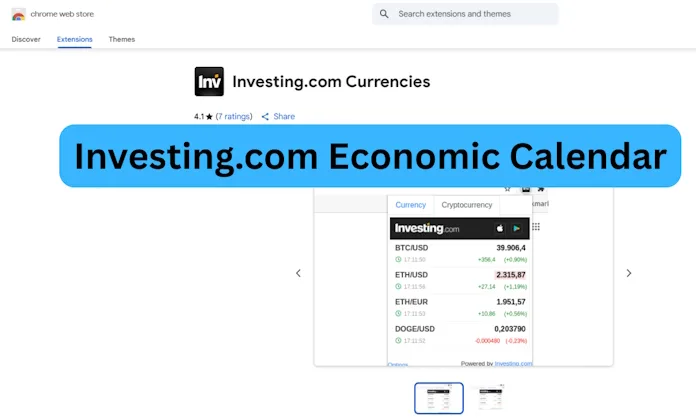
Investing.com is one of the most trusted global financial websites, and its economic calendar is widely regarded as a gold standard. The Chrome extension integrates this functionality, giving traders an instant way to check upcoming events, filter by importance, and even receive alerts. Unlike some niche calendars, Investing.com provides coverage of macroeconomic data, corporate earnings, public holidays, and central bank events, making it one of the most complete tools available.
Pros:
- Extremely comprehensive coverage across macro events, corporate earnings, and holidays.
- Built-in alert system, with notifications synced to Investing.com’s mobile and web platforms.
- Familiar, user-friendly interface.
- Supported by a globally recognized and trusted financial brand.
Cons:
- Some advanced filtering options are only available on the main website, not inside the extension.
- Without filters, the sheer volume of data can overwhelm new traders.
- Market news feed may feel noisy if you only want calendar data.
Who it’s best for:
Traders who want the broadest possible coverage and reliable alerts. Especially recommended for those who monitor multiple asset classes or trade internationally.
- TFlab (Economic Calendar TFlab Events Extension)
Why traders like it:
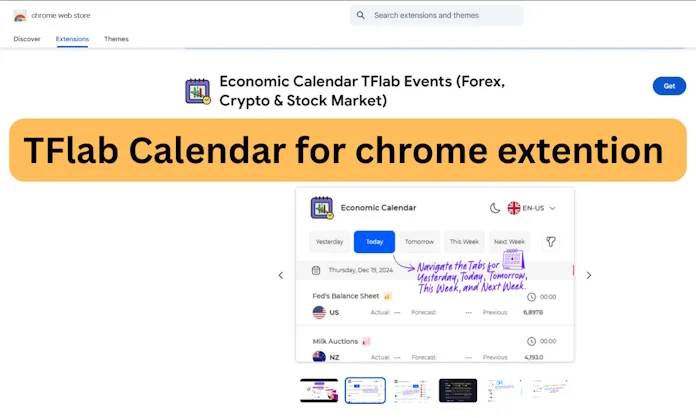
Unlike many calendar tools that focus exclusively on Forex or macroeconomic events, TFlab positions itself as a multi-asset calendar. Covering Forex, crypto, and stock markets from 21 regions, it’s one of the few tools designed for traders who operate across asset classes. This makes it particularly attractive for those who combine cryptocurrency trading with traditional markets.
Pros:
- Supports multiple markets: Forex, crypto, and stocks.
- Simple extension with direct event access.
- Convenient for traders who prefer an all-in-one calendar.
Cons:
- Smaller user base with fewer reviews compared to bigger platforms.
- Update cadence and extension permissions should be checked carefully.
- Alerts and advanced filtering may not be as developed as in Investing.com or Myfxbook.
Who it’s best for:
Multi-asset traders who don’t want to juggle separate calendars for crypto and Forex. A good choice for traders experimenting with cross-market strategies.
- Forex Factory (Website + Third-Party Extensions)
Why traders like it:
Forex Factory’s calendar is arguably the most popular Forex-specific calendar in the world. Generations of traders have relied on it to track high-impact events like NFP, CPI, and central bank decisions. While the site itself doesn’t offer an official Chrome extension, many third-party developers have created wrappers that display FF’s calendar inside the browser toolbar.
Pros:
- Extremely focused on Forex market movers.
- Widely trusted and highly regarded among professional traders.
- Perfect for event-driven FX strategies.
Cons:
- No official extension — third-party versions may raise security and data-permission concerns.
- Does not provide coverage for crypto or equities.
- Fewer customization options compared to Investing.com.
Who it’s best for:
Pure Forex traders who trust the Forex Factory ecosystem and want a no-frills, FX-first calendar.
- Myfxbook (Economic Calendar, Market & News Extension)
Why traders like it:
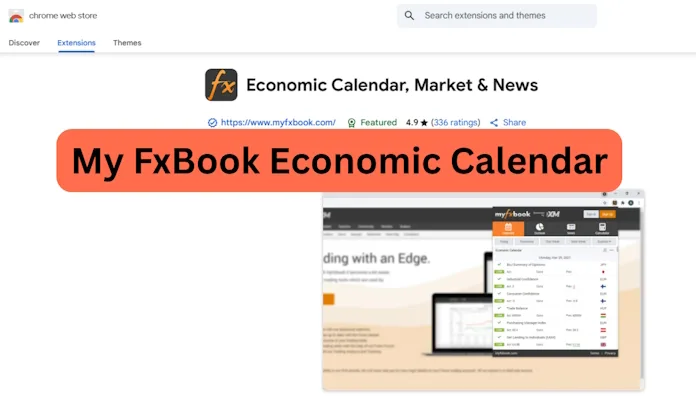
Myfxbook is a household name in the Forex trading community. This extension combines three useful tools in one: an economic calendar, market news, and Forex sentiment. Instead of just showing when an event occurs, Myfxbook’s integration allows traders to immediately gauge market positioning and how other traders are leaning (long vs short sentiment).
The extension claims to track over 1,000 real-time events, making it highly relevant for intraday and swing traders who rely on sentiment shifts.
Pros:
- Forex-centric design with sentiment and news built in.
- Quick toolbar popup with lightweight interface.
- Large user base among Forex traders, ensuring active updates.
Cons:
- Less visually polished compared to large portals like FXStreet or Investing.com.
- Some alert features require a Myfxbook account.
- May feel too FX-specialized for traders who want equities or crypto coverage.
Who it’s best for:
Primarily Forex traders who value sentiment analysis alongside the calendar. Not ideal for those seeking broad multi-asset coverage.
- FXStreet (Extension + Calendar)
Why traders like it:
FXStreet is one of the most respected names in Forex news and education, and its calendar is built specifically with FX traders in mind. The Chrome extension provides streamlined access to the economic calendar, real-time exchange rates, and FXStreet’s respected market analysis.
Pros:
- Forex-focused with strong usability.
- Calendar filters by impact, country, and timezone.
- Good ratings in the Chrome Web Store, indicating reliability.
Cons:
- Limited crypto coverage compared to TFlab or TradingFinder.
- Some advanced features are only available through the main site or widgets.
Who it’s best for:
Traders who are deeply focused on Forex and prefer a specialist provider with years of credibility.
Recommendations
- All-around best choice: Investing.com — unmatched coverage, alerts, and cross-device sync.
- For Forex specialists: Myfxbook (for sentiment) or FXStreet (for polished usability).
- For multi-asset traders (crypto + FX + stocks): TFlab or TradingFinder.
- For hardcore FX calendar purists: Forex Factory.
Security & Practical Tips Before Installing
Economic calendar extensions save time, but not all of them are created equal. Since these tools live in your browser, security should be a top priority:
- Check permissions carefully. Avoid extensions that request the ability to “read and change all your data on all websites” unless it’s from a trusted, official provider.
- Prefer official sources. Always install extensions from the official publisher (Investing.com, Myfxbook, FXStreet, TradingFinder) rather than third-party clones.
- Verify updates. A stale extension that hasn’t been updated in years may stop working or, worse, pose risks.
- Use web alerts as a backup. Even if the extension doesn’t support custom alerts, most websites (like Investing.com and Forex Factory) allow you to set notifications or export events to Google Calendar.
- Don’t rely solely on one tool. Professional traders often check multiple calendars to cross-verify event times and data accuracy.
Fresh Insights on Economic Calendar Extensions for Traders (2025 Update)
Economic calendars are not static tools. The best ones evolve with markets, new regulations, and trader needs. Since browser extensions are frequently updated—or abandoned—it’s important to reassess which tools remain reliable and which bring unique advantages. Below, we take a closer look at some fresh details from 2025 that add context to the most popular calendar extensions and websites.
The trading landscape in 2025 underscores that not all calendars are equal. Myfxbook’s active updates and excellent ratings confirm its reliability. TradingFinder’s massive geographic reach makes it invaluable for globally oriented traders. TFlab continues to refine a niche for multi-asset and multilingual users, while Forex Factory retains its crown as a trusted source of accurate, FX-focused data with community-driven insight. For traders, combining one or two of these updated tools—while staying mindful of security practices—offers the best way to stay informed and prepared for the fast-moving world of financial markets.
TradingFinder: Expanding Its Global Reach
The TradingFinder calendar continues to differentiate itself by scale. Its Chrome extension covers around 40 countries, but the web version has expanded to track data from over 150 economies worldwide. That scope is rare among trading calendars, putting it closer to a true global macroeconomic monitor than a narrow trading add-on. This breadth means traders can not only track events from the U.S. and EU but also gain awareness of developments in emerging markets, which increasingly influence global capital flows.
Myfxbook: Proven Reliability with Active Updates
One of the standout performers this year is the Myfxbook “Economic Calendar, Market & News” extension. It has earned the trust of its user base, reflected in a stellar 4.9 out of 5 rating from more than 330 reviews. Unlike many financial extensions that stagnate, this one has seen recent updates as of late August 2025, confirming active development and responsiveness to browser changes. Beyond its calendar, it integrates tools such as Forex sentiment, live market news, and even practical calculators for pip value and margin—features that give it a utility far beyond a simple schedule checker.
TFlab: Multilingual and Multi-Asset Friendly
Another update worth highlighting is the evolution of TFlab’s economic calendar extension. While its regional coverage spans 21 areas, what sets it apart now is its multilingual interface and support for multiple asset classes—Forex, crypto, and stocks in the same compact tool. Traders can switch time zones, toggle between light and dark themes, and filter events by day or week. Just as important, TFlab requires minimal permissions, a plus in a landscape where many third-party add-ons raise security questions. This focus on accessibility and low intrusion makes it attractive to privacy-conscious traders.
Forex Factory: Community as a Competitive Edge
While many traders know Forex Factory for its calendar, its deeper strength lies in its community-driven analysis. Around every major release, thousands of traders discuss scenarios, expectations, and live reactions in the forums. This makes the calendar more than a data feed—it becomes a real-time sentiment gauge, especially for high-impact announcements like NFP or interest rate decisions. The site has also been praised for the accuracy of its forecasts, often rivalling larger financial portals, making it a dependable option despite lacking an official extension.
Forecast Accuracy and Market Trust
A comparative review of top economic calendars in 2025 placed Forex Factory and Myfxbook among the most accurate when it comes to forecasting high-volatility events. This reinforces why so many traders still default to them despite flashier alternatives. Accuracy in expected vs. actual outcomes is not a trivial matter—an inaccurate forecast can mislead traders just as much as missing an event entirely. This reliability factor should weigh heavily when choosing a primary calendar.
Security, Browser Performance, and Manifest V3
One often overlooked consideration with extensions is their effect on browser security and performance. Research in 2024–2025 showed that some poorly optimized extensions slow page loads and increase energy consumption, especially if they request broad permissions. Traders should therefore look for tools that have migrated to Google’s Manifest V3 framework, which emphasizes security, privacy, and tighter permission controls. Many of the better-known financial calendars have already adopted this model, making them safer choices compared to little-known alternatives.
Final Thoughts
For modern traders, keeping track of economic events is not a luxury—it’s a survival tool. A single overlooked release can wipe out weeks of gains, while being prepared allows traders to turn volatility into opportunity. Chrome extensions make this process faster and more integrated into everyday workflows, reducing the risk of missed announcements.
Ultimately, the best economic calendar tool depends on your trading style. If you’re a Forex-only trader, FXStreet or Myfxbook may be all you need. If you balance equities, crypto, and macro trading, then Investing.com or TFlab might better suit your strategy. And if you want a quick, no-frills FX-first calendar, Forex Factory remains a timeless choice.
By combining one or two of these tools and practicing good extension hygiene (checking permissions, updating regularly, and verifying events), traders can stay ahead of the news cycle and approach markets with more confidence.