In the modern digital era, the data we generate and store has never been more valuable. From cherished family photos to essential work documents, much of our personal and professional life relies on the integrity of our storage devices. But when accidents happen—whether through deletion errors, hardware failure, or corruption—the path to recovery often lies with professional data recovery services. While both hard disk drives (HDDs) and solid-state drives (SSDs) serve the same purpose of storing data, the way they operate and the challenges involved in recovering data from them are fundamentally different. Understanding these distinctions is key to making informed decisions and improving your chances of retrieving lost files.
How HDDs and SSDs Store Data
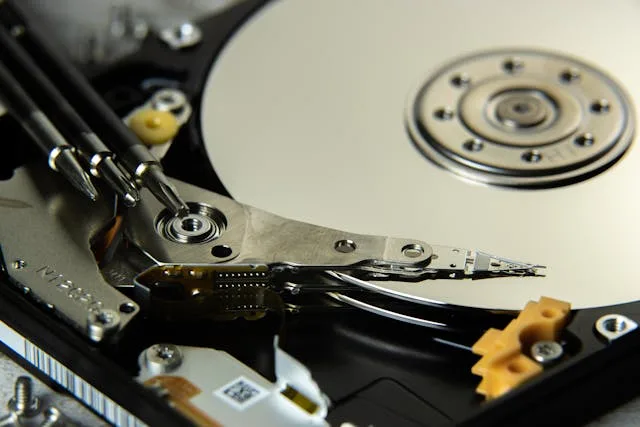
Hard Disk Drives (HDDs) have been a staple of data storage for decades. They store information on spinning magnetic platters, with a mechanical read/write head moving across the surface to access files. Think of them as digital record players. HDDs are prone to failure primarily due to mechanical wear, head crashes, or platter damage, especially after long-term use.
Solid-State Drives (SSDs), by contrast, use interconnected flash memory chips to store data. Without moving parts, SSDs are faster, quieter, and more resistant to physical shocks. However, they have their own vulnerabilities, including wear on memory cells over time, sudden controller failures, firmware corruption, or power surge damage.
Because of these structural differences, data recovery techniques differ significantly between HDDs and SSDs, requiring distinct tools and expertise.
Common Causes of Data Loss
Regardless of drive type, there are several frequent scenarios that lead to lost data:
- Accidental deletion – Files removed unintentionally, sometimes bypassing the recycle bin.
- Drive failure – Mechanical or electronic malfunctions that prevent access.
- File system corruption – Often caused by software errors, malware, or improper shutdowns.
- Firmware issues – Particularly affecting SSDs, where a malfunction can block drive access.
- Physical damage – Dropping, spills, or extreme environmental conditions can damage drives irreparably.
HDD Data Recovery: Precision Meets Mechanics
Recovering data from HDDs often involves addressing physical issues first. Some typical recovery steps include:
- Head crashes – Replacing the read/write head in a controlled cleanroom environment.
- Motor failure – Transplanting platters to a functional enclosure.
- Surface damage – Using specialized imaging tools to salvage readable sectors and reconstruct files.
Since HDDs store data magnetically, even partially damaged sectors may yield recoverable information. However, HDD recovery is highly sensitive to contamination. Dust, static, or mishandling can make the problem worse, which is why at-home repairs are rarely successful.
SSD Data Recovery: A Digital Puzzle
SSDs present a different set of challenges. Physical failures are less common due to the absence of moving parts, but other issues can be more complex:
- Controller chip failure – The SSD’s “brain” becomes inaccessible.
- NAND wear – Flash memory cells degrade after many write cycles.
- Encryption – Many SSDs encrypt data by default, making recovery impossible without keys.
- Firmware corruption – Power loss or failed updates can damage mapping tables.
Professional recovery often requires direct access to NAND chips in a process called “chip-off recovery,” where raw data is read and reconstructed. This is highly technical, time-consuming, and demands advanced expertise. Unlike HDDs, SSD recovery is frequently an all-or-nothing situation; if the controller fails or encryption keys are lost, access to data may be impossible.
The Value of Professional Data Recovery
While DIY software or free tools may seem tempting, professional data recovery services offer distinct advantages:
- Cleanroom facilities – Essential for safe handling of mechanical failures.
- Proprietary tools – Designed to interpret data structures unique to specific drive models.
- Firmware expertise – Professionals know how to repair or bypass corrupted firmware.
- Higher success rates – Particularly when hardware damage is involved.
Attempting recovery yourself, especially opening drives or tampering with SSD chips, often reduces the likelihood of success. Even repeatedly powering a failing drive can worsen the problem.
Preventing Data Loss
After experiencing data loss, prevention becomes a priority. Best practices include:
- Regular backups – Follow the 3-2-1 rule: 3 copies, 2 different media types, 1 offsite.
- Drive monitoring – Tools like CrystalDiskInfo can provide early warnings of failure.
- Avoid sudden power loss – Use surge protectors or an uninterruptible power supply (UPS).
- Careful firmware updates – Only from trusted sources, with verified compatibility.
- Gentle handling – Especially HDDs, which are vulnerable to shocks.
Cost Considerations
Data recovery costs depend on drive type, severity of damage, and the volume of data. HDD recovery can range from inexpensive software solutions for logical failures to costly cleanroom repairs for mechanical issues. SSD recovery is often more expensive due to complex chip-level work, especially with encryption or proprietary controllers involved.
For invaluable personal or business data, professional recovery is usually the most viable option.
Choosing a Data Recovery Service
Not all recovery companies provide the same level of expertise. Look for:
- Proven experience with both HDDs and SSDs.
- “No data, no fee” policies to minimize financial risk.
- Transparent communication about potential outcomes and costs.
- Certified cleanroom facilities for mechanical repairs.
- Strong data confidentiality protocols.
No storage device is immune to failure, whether HDD or SSD. Understanding their differences and the unique challenges each presents is key to informed decision-making when data loss occurs. While online guides and software can be helpful, professional data recovery remains the most reliable solution.
Ultimately, prevention is the best strategy. Regular backups, careful handling, and ongoing maintenance can save you from both stress and financial cost. But if disaster strikes, knowing that skilled experts can often restore your files offers peace of mind in an increasingly digital world.