

You know that moment when your Reel, TikTok, or Short finally pops off — the algorithm loves you, the comments roll in, and shares go wild? It’s magic. But what happens when that same clip fizzles in another market? Spoiler: it’s probably not your content — it’s your language barrier.
The truth is, your top-performing video doesn’t have to stop at your local audience. Repurposing is a superpower — and with a link to video converter like Pippit, you can transform that same piece of content into translated teasers, subtitled highlights, or region-specific Reels that keep your brand buzzing far beyond your neighborhood.
So if you’re ready to make your hits go global, keep reading. I’m sharing how to break the one-language ceiling, sprinkle in SEO magic, and squeeze every ounce of reach from your best clips. Let’s get those views flying across borders!
Why your viral clip deserves a second (and third) life
We all know repurposing is king — you’ve heard it a million times: ‘Work smarter, not harder!’ But so many creators only think about cropping their video into different aspect ratios or cutting it down for a Short or Story. That’s a great start — but if you’re not translating, you’re leaving massive views on the table.
Imagine your top English TikTok chopped into a 15-second Reel with Spanish captions. Or your YouTube Shorts dubbed in Portuguese for your growing Brazil fanbase. That’s the secret sauce: one idea, many formats, multiple languages.
When you pair smart translation with smart editing, you’re no longer just hoping people will ‘get it.’ You’re speaking their language — literally. That’s what makes people stay, share, and engage.
Big gains from small tweaks: why translation works
Why does this strategy pack such a punch? Here’s what happens when you adapt your viral clip for new audiences:
- Unlock new markets: Instead of competing for the same eyes, you show up in feeds that never see your English-only post.
- Boost watch time: Viewers stick around longer when they understand what you’re saying — no second guessing or skipping.
- Improve search visibility: Multilingual subtitles and metadata mean you pop up in search results for multiple languages, not just your native tongue.
- Build trust: When you talk to people in their language, they feel seen. That’s an instant connection boost.
Multi-format, multi-lingual: your winning remix combo
A solid repurposing plan combines both smart cuts and language tweaks. So what does that look like in practice? Before you jump into Pippit’s free video translator, here’s a mini game plan:
- Cut your hero clip into micro-moments: Pull out quotable soundbites, funny outtakes, or high-impact scenes that make perfect Shorts or Stories.
- Sync captions and voiceovers: Add auto-translated subtitles so viewers know exactly what you’re saying — even on mute.
- Match the vibe: A casual, fun clip should feel just as casual in another language. Adjust slang, jokes, and tone so you sound local, not robotic.
- Optimize for SEO: Add translated keywords to your video titles, tags, and captions so they get picked up by search algorithms in other languages.
Now you’re not just recycling content — you’re giving it a glow-up for each audience.
When a free video translator makes life 100x easier
You could do all this manually — but you’d need a big team or endless hours. This is where a free video translator and a smart link to video converter like Pippit come in. Pippit’s AI Video Generator takes care of the heavy lifting, letting you upload, subtitle, translate, and share without feeling like you need a film crew.
Here’s how you can get started.
How to translate your viral clips with Pippit
Ready to spin your homegrown hit into an international sensation? Let’s break it down step-by-step so you can keep things moving without losing your mind.
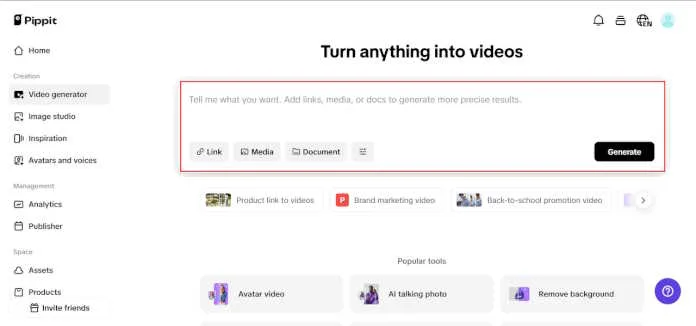
Step 1: Go to the video generator and add your clip
Start by going to the Video Generator option on your dashboard after logging into your Pippit account. The convenient input field titled ‘Start with your product link or media‘ is visible there. Pippit’s link to video converter excels in this situation; simply paste the link to your video from websites like Amazon, Shopify, or TikTok Shop, or select ‘Add Media‘ to submit your clip directly from your device. Within seconds, your viral hit is ready for a worldwide remix.
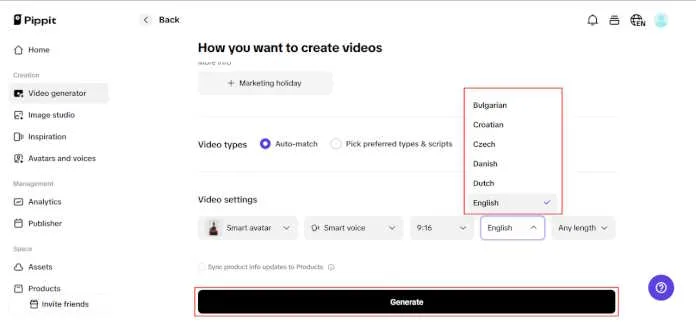
Step 2: Personalize your video for new languages
After uploading your media, make sure your product or content title is accurate, then select the must-watch details in the given fields. Next, find the Language dropdown. This is where the magic happens — choose the new language you’d like your captions or scripts translated to. Want to mix it up with voiceovers or avatars? Explore Advanced Settings to customize your vibe and maintain your brand personality intact. Once satisfied, click on ‘Generate‘ and allow the AI to get to work.
Step 3: Translate, refine, and export
Once your draft is created, click ‘Edit More‘ to bring up the Image Editor. Go to the Captions panel and click Auto Captions to capture instant subtitles. Click on the translate icon (the small language globe) to reveal your translation menu, select your source and target languages, and click ‘Translation‘. Check the subtitles, fine-tune timing if required, and ensure they play in complete synchronization with your graphics.
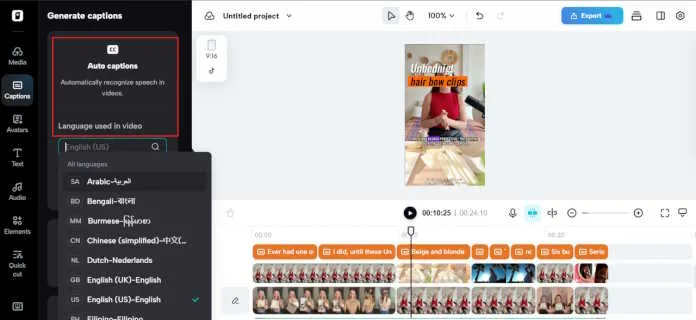
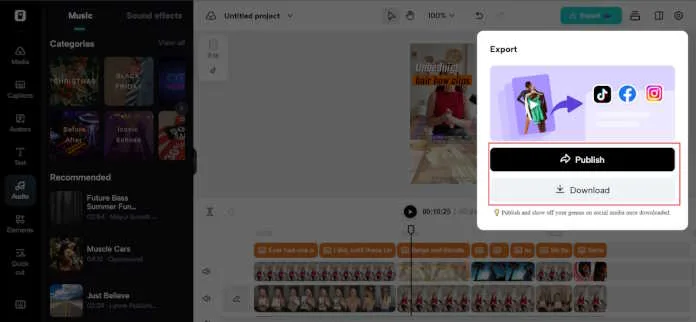
Once you’re happy, click ‘Export,’ select your preferred resolution and format, and your clip is ready to take over a new market on YouTube, TikTok, or Instagram.
Tiny tweaks, massive impact: your new global blueprint
Never underestimate how powerful it is to squeeze every drop of value from your best clips. When you combine smart video cuts with thoughtful translations, you turn one viral moment into a magnet for audiences around the world.
So, what’s your next move? Try a simple test: grab a clip that’s already done well, run it through Pippit’s link to video converter, translate it, and post the new version in a different language. Watch how your reach grows — no new shoot needed.
Your call to action: make your hits travel
Going global shouldn’t feel impossible. With Pippit’s AI Video Generator, you can do it all: edit, translate, and repurpose — from your laptop, without extra stress.
So why settle for ‘viral at home’ when you can go viral abroad, too? Log in to Pippit today, and let’s make your next clip a passport stamp for your brand.